> ## Documentation Index
> Fetch the complete documentation index at: https://docs.synctera.com/llms.txt
> Use this file to discover all available pages before exploring further.
# Performing Reconciliation
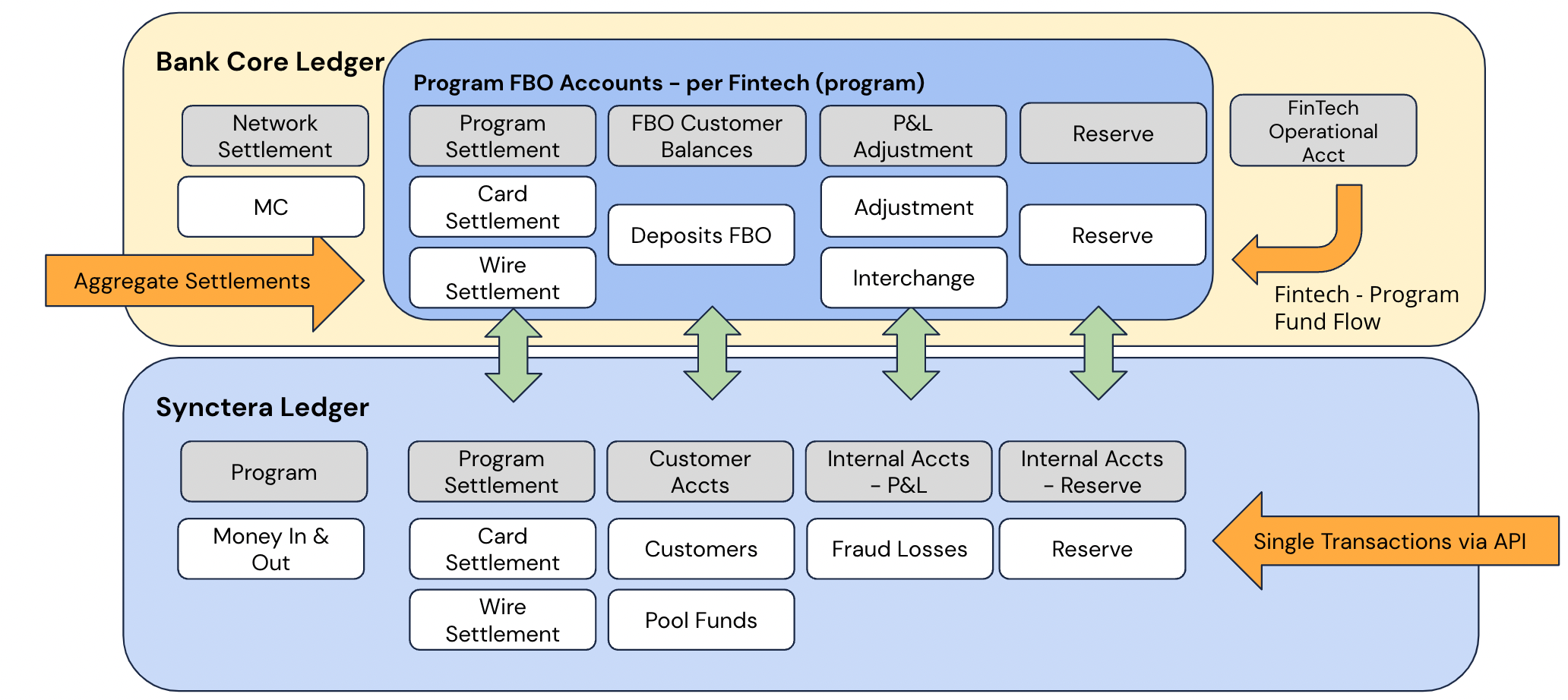
> In order to close the books successfully, Sponsor Banks and Synctera will need to go through an End of Day process that syncs the subledger and the FBO FinTech accounts on a daily basis.
This includes the operational postings and updates needed as well as the reconciliation of the books.
The simple process is comprised of the following steps
 ## Managing Reconciliation
The Bank will provide two daily CSV files in order for Synctera to ingest into the Platform. This allows Synctera to display the Bank’s FinTech related accounts and transactions from the Core in the Synctera Platform in order to reconcile the transactions with the Synctera ledger.
### Accounts CSV
The Bank will export the Accounts CSV file and drop it in the FTP folder with Synctera once a day.
### Transactions CSV
The Bank will export the Transactions CSV file and drop it in the FTP folder with Synctera once a day.
## ACH Reconciliation
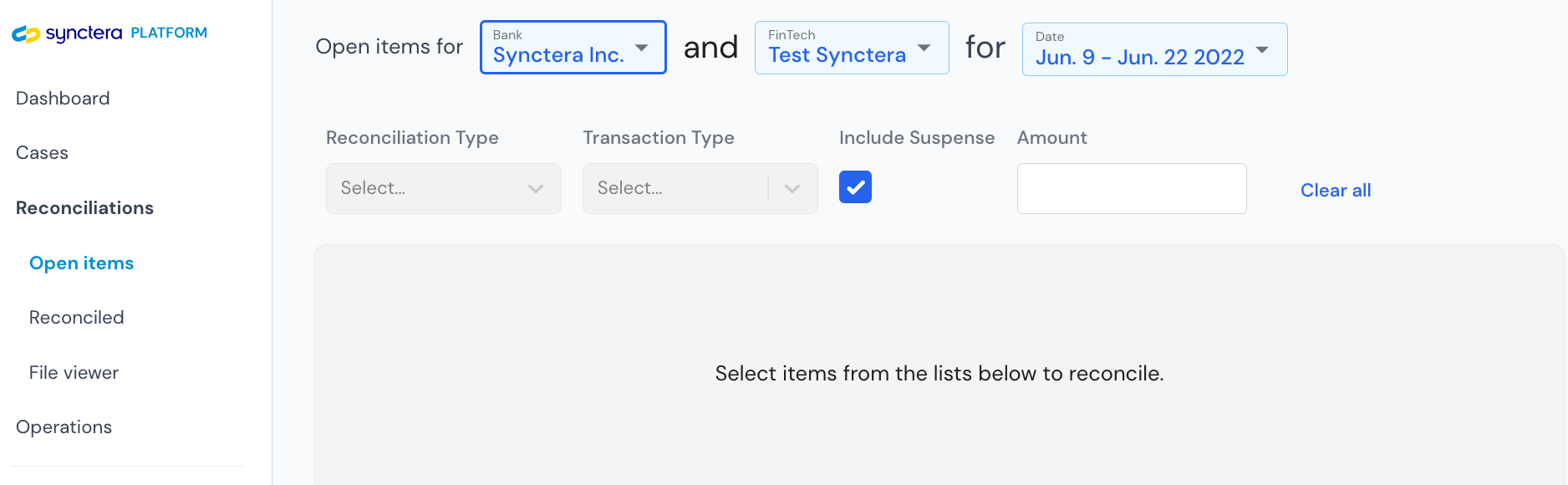
Bank Operations will engage in reconciliation efforts in the Synctera Platform: [https://app.synctera.com####](https://app.synctera.com####) ACH File Summary View
## Managing Reconciliation
The Bank will provide two daily CSV files in order for Synctera to ingest into the Platform. This allows Synctera to display the Bank’s FinTech related accounts and transactions from the Core in the Synctera Platform in order to reconcile the transactions with the Synctera ledger.
### Accounts CSV
The Bank will export the Accounts CSV file and drop it in the FTP folder with Synctera once a day.
### Transactions CSV
The Bank will export the Transactions CSV file and drop it in the FTP folder with Synctera once a day.
## ACH Reconciliation
Bank Operations will engage in reconciliation efforts in the Synctera Platform: [https://app.synctera.com####](https://app.synctera.com####) ACH File Summary View
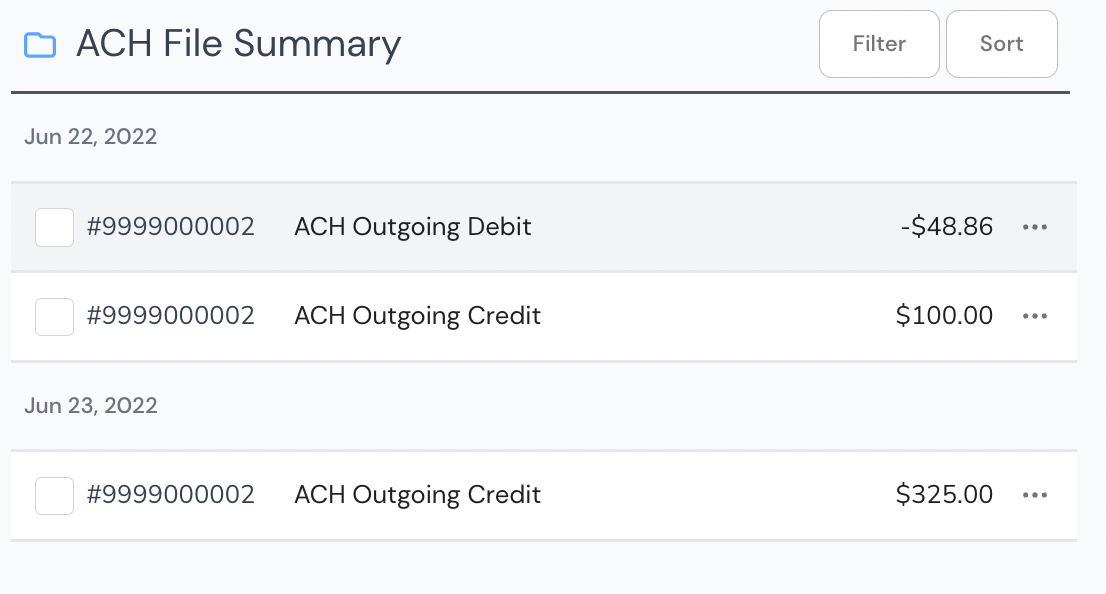 ACH File Summary shows the sum total of outgoing debit and outgoing credit per FinTech.
The following steps demonstrate the end of day processing for the Sponsor Bank's operations team:
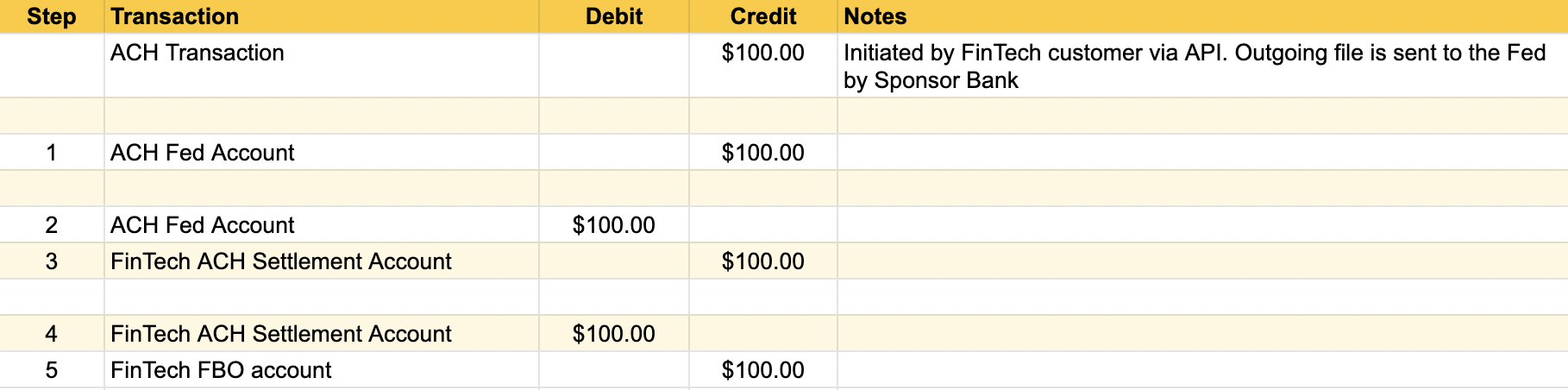
1. The Bank debits/credits the FED settlement account and debits/credits the FinTech's settlement account for the value of the credit/debit sweep transaction in the Synctera system - this value represents all the credits/debits for the FinTech to be settled with the Fed.
2. If this does not match the settlement from the Fed, a reconciliation difference will exist that will need to be investigated based on the reconciliation function in the Synctera App.
3. After the Bank moves all the Credit/Debits to the FinTech Settlement account, the Fed settlement account should be ‘zero’ and it is balanced against the FinTech settlement account.
4. From the Settlement account, money is moved manually in the Sponsor Bank's Banking Core to the FinTech FBO account - now the FinTech is balanced for ACH.
## Debit Card Reconciliation
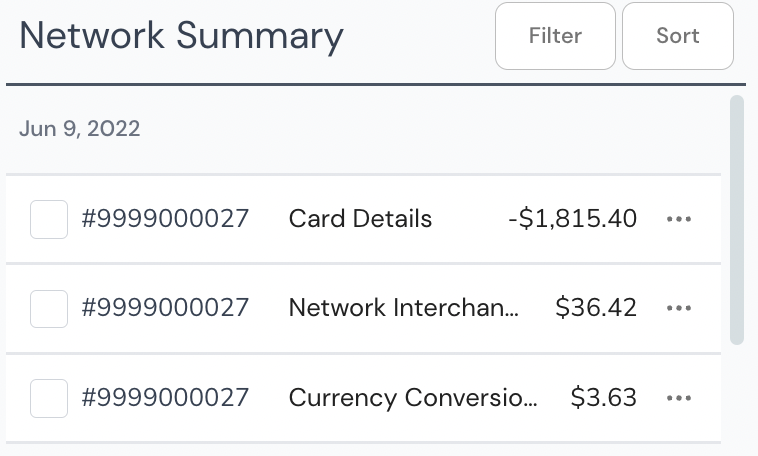
Sponsor Banks will use the Synctera Platform to reconcile any debit card transactions. On a daily basis, Banks will receive a Mastercard drawdown or the Mastercard Settlement. The amounts reflected in the drawdown can be reconciled with the data from Mastercard & Pulse that Synctera receives from Marqeta. The Network Summary displays this data as an aggregate with Gross transaction values and the Interchange and Currency Conversion Fee values.
* **Card Details**: Sum total amount of card transactions on a given day per network
* **Network Interchange**: Sum total amount of interchange on a given day per network
* **Currency Conversion Fee**: Sum total amount of foreign exchange fees per network
ACH File Summary shows the sum total of outgoing debit and outgoing credit per FinTech.
The following steps demonstrate the end of day processing for the Sponsor Bank's operations team:
1. The Bank debits/credits the FED settlement account and debits/credits the FinTech's settlement account for the value of the credit/debit sweep transaction in the Synctera system - this value represents all the credits/debits for the FinTech to be settled with the Fed.
2. If this does not match the settlement from the Fed, a reconciliation difference will exist that will need to be investigated based on the reconciliation function in the Synctera App.
3. After the Bank moves all the Credit/Debits to the FinTech Settlement account, the Fed settlement account should be ‘zero’ and it is balanced against the FinTech settlement account.
4. From the Settlement account, money is moved manually in the Sponsor Bank's Banking Core to the FinTech FBO account - now the FinTech is balanced for ACH.
## Debit Card Reconciliation
Sponsor Banks will use the Synctera Platform to reconcile any debit card transactions. On a daily basis, Banks will receive a Mastercard drawdown or the Mastercard Settlement. The amounts reflected in the drawdown can be reconciled with the data from Mastercard & Pulse that Synctera receives from Marqeta. The Network Summary displays this data as an aggregate with Gross transaction values and the Interchange and Currency Conversion Fee values.
* **Card Details**: Sum total amount of card transactions on a given day per network
* **Network Interchange**: Sum total amount of interchange on a given day per network
* **Currency Conversion Fee**: Sum total amount of foreign exchange fees per network
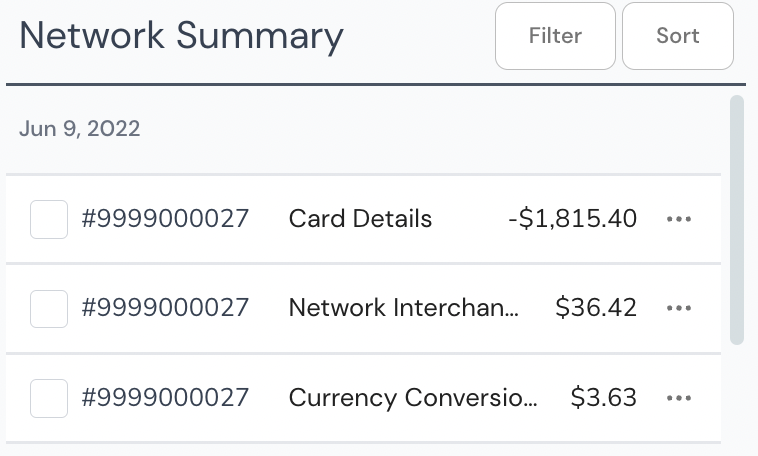 The Mastercard Settlement amount will equal the (Card Details - Network Interchange + Currency Conversion Fee)
Mastercard Settlement = Card Details - Network Interchange + Currency Conversion Fee
$1782.61 = $1815.40 - $36.42 + $3.63
### Debit Card End of Day Processing
The following steps demonstrate the end of day processing for the Sponsor Bank's operations team:
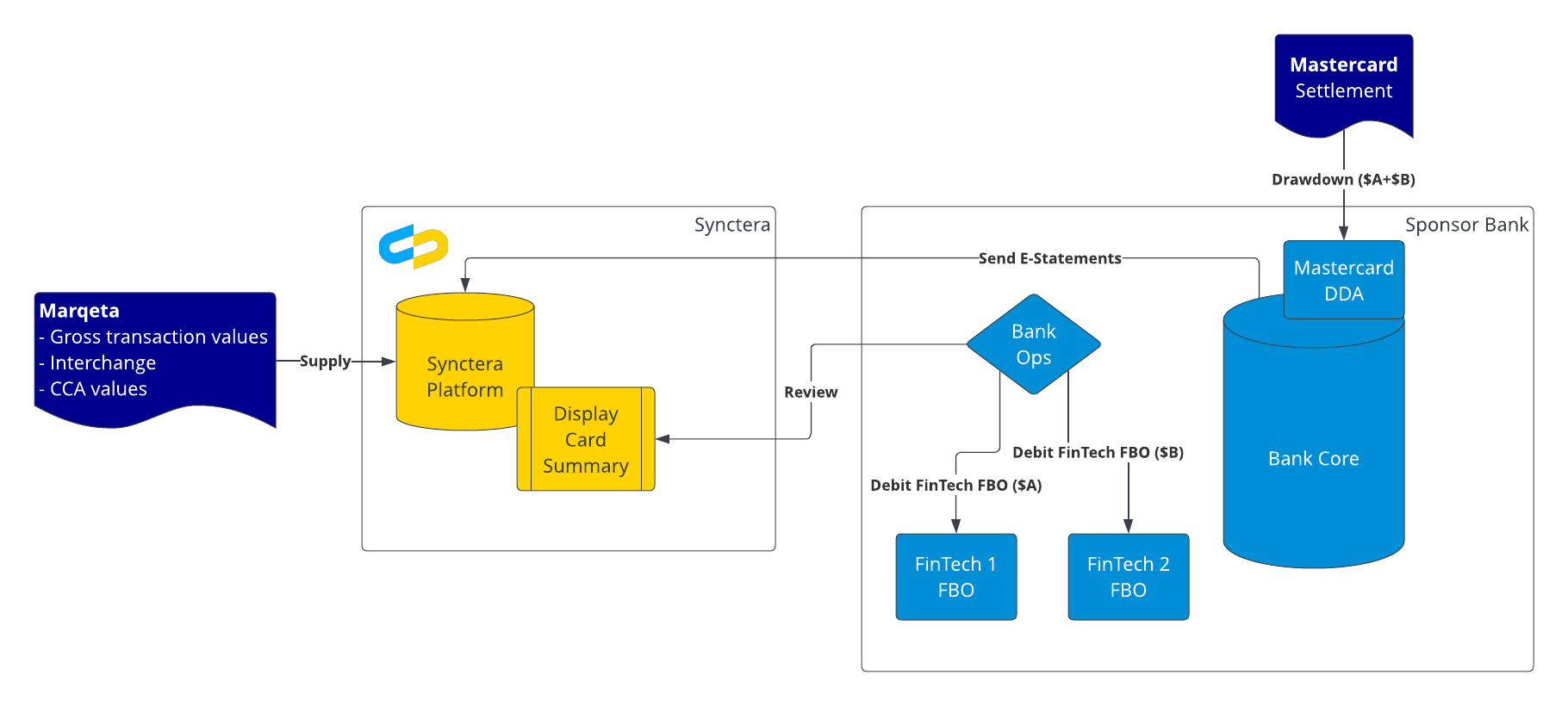
1. Review Mastercard Settlement or Mastercard drawdown amount from the Sponsor Bank's Mastercard DDA
2. Review the Synctera Platform in order to determine the drawdown amounts *per FinTech*.
3. Debit the FinTech FBOs based on information gathered in Step 2.
4. Send the interchange to Synctera's t-10 LLC
5. Synctera to send the interchange revenue share to the Sponsor Bank
The Mastercard Settlement amount will equal the (Card Details - Network Interchange + Currency Conversion Fee)
Mastercard Settlement = Card Details - Network Interchange + Currency Conversion Fee
$1782.61 = $1815.40 - $36.42 + $3.63
### Debit Card End of Day Processing
The following steps demonstrate the end of day processing for the Sponsor Bank's operations team:
1. Review Mastercard Settlement or Mastercard drawdown amount from the Sponsor Bank's Mastercard DDA
2. Review the Synctera Platform in order to determine the drawdown amounts *per FinTech*.
3. Debit the FinTech FBOs based on information gathered in Step 2.
4. Send the interchange to Synctera's t-10 LLC
5. Synctera to send the interchange revenue share to the Sponsor Bank
 #### How to determine the drawdown amounts per FinTech
[https://app.synctera.com](https://app.synctera.com/)
#### How to determine the drawdown amounts per FinTech
[https://app.synctera.com](https://app.synctera.com/)
 ## Flow of Funds
### ACH
## Flow of Funds
### ACH
 ### Debit Cards
 ### Debit Cards with Currency Conversion Fees
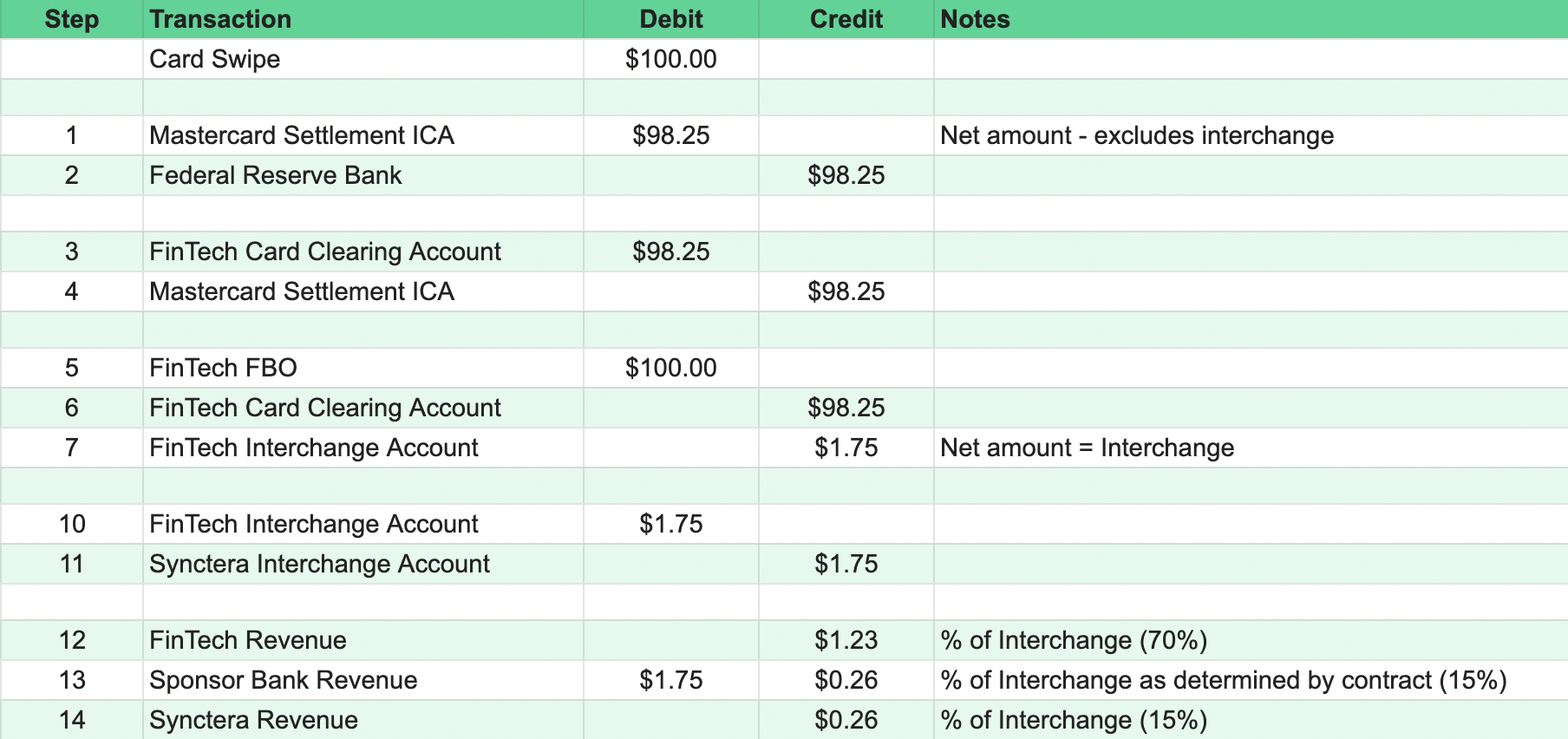
| Step | Transaction | Debit | Credit | Notes |
| ---- | ----------------------------- | ------- | ------- | ------------------------------------------------ |
| | Card Swipe | \$13.78 | | |
| | | | | |
| 1 | Mastercard Settlement ICA | \$13.53 | | Net amount - excludes interchange |
| 2 | Federal Reserve Bank | | \$13.53 | |
| | | | | |
| 3 | FinTech Card Clearing Account | \$13.53 | | |
| 4 | Mastercard Settlement ICA | | \$13.53 | |
| | | | | |
| 5 | FinTech FBO | \$13.78 | | |
| 6 | FinTech Card Clearing Account | | \$13.53 | |
| 7 | FinTech Interchange Account | | \$0.28 | Net amount = Interchange |
| | | | | |
| 8 | FinTech Operational Account | \$0.03 | | Bank Account at the Sponsor Bank |
| 9 | FinTech PnL Account | | \$0.03 | |
| | | | | |
| 10 | FinTech Interchange Account | \$0.28 | | |
| 11 | Synctera Interchange Account | | \$0.28 | |
| | | | | |
| 12 | FinTech Revenue | | \$0.196 | % of Interchange (70%) |
| 13 | Sponsor Bank Revenue | \$0.28 | \$0.042 | % of Interchange as determined by contract (15%) |
| 14 | Synctera Revenue | | \$0.042 | % of Interchange (15%) |
### Debit Cards with Currency Conversion Fees
| Step | Transaction | Debit | Credit | Notes |
| ---- | ----------------------------- | ------- | ------- | ------------------------------------------------ |
| | Card Swipe | \$13.78 | | |
| | | | | |
| 1 | Mastercard Settlement ICA | \$13.53 | | Net amount - excludes interchange |
| 2 | Federal Reserve Bank | | \$13.53 | |
| | | | | |
| 3 | FinTech Card Clearing Account | \$13.53 | | |
| 4 | Mastercard Settlement ICA | | \$13.53 | |
| | | | | |
| 5 | FinTech FBO | \$13.78 | | |
| 6 | FinTech Card Clearing Account | | \$13.53 | |
| 7 | FinTech Interchange Account | | \$0.28 | Net amount = Interchange |
| | | | | |
| 8 | FinTech Operational Account | \$0.03 | | Bank Account at the Sponsor Bank |
| 9 | FinTech PnL Account | | \$0.03 | |
| | | | | |
| 10 | FinTech Interchange Account | \$0.28 | | |
| 11 | Synctera Interchange Account | | \$0.28 | |
| | | | | |
| 12 | FinTech Revenue | | \$0.196 | % of Interchange (70%) |
| 13 | Sponsor Bank Revenue | \$0.28 | \$0.042 | % of Interchange as determined by contract (15%) |
| 14 | Synctera Revenue | | \$0.042 | % of Interchange (15%) |