> ## Documentation Index
> Fetch the complete documentation index at: https://docs.synctera.com/llms.txt
> Use this file to discover all available pages before exploring further.
# Statements
> A statement is a disclosure of the state of an account, and its activity, over a billing period. Synctera will generate a statement payload for any account that requires periodic statements to be provided to the customer, through the [Statements API](/reference/liststatements). These payloads are made available at the end of every billing period, which is usually from the first to the last day of a calendar month.
At this time, Synctera does not generate a printable version of a statement.
### Prerequisites
This guide assumes that you are already familiar with the customer and account APIs, and have one or more accounts created.
If this is not the case, refer to the following guides:
## Statement generation
The V0 version of this API only supports statements for `CHECKING` and `SAVING` accounts. More account types are currentlu supported. For the full specification of V2, [see our V2 Statement Guide](https://dashboard.mintlify.com/synctera/synctera/editor/main/~/v2/docs/statements-guide.mdx).
A statement is generated automatically at the end of an account's billing period. At this time, billing frequency is monthly, meaning that at the end of every calendar month a bank statement will be generated for every eligible account:
| Account type | Eligibility |
| ------------ | ------------------------------------------------------------------------ |
| `CHECKING` | Eligible, but only if the account was active during the statement period |
| `SAVING` | Eligible |
Once a statement is generated, a notification will be sent via webhook. Please refer to the [Webhook Events](#webhook-events) section for details.
### Statement content
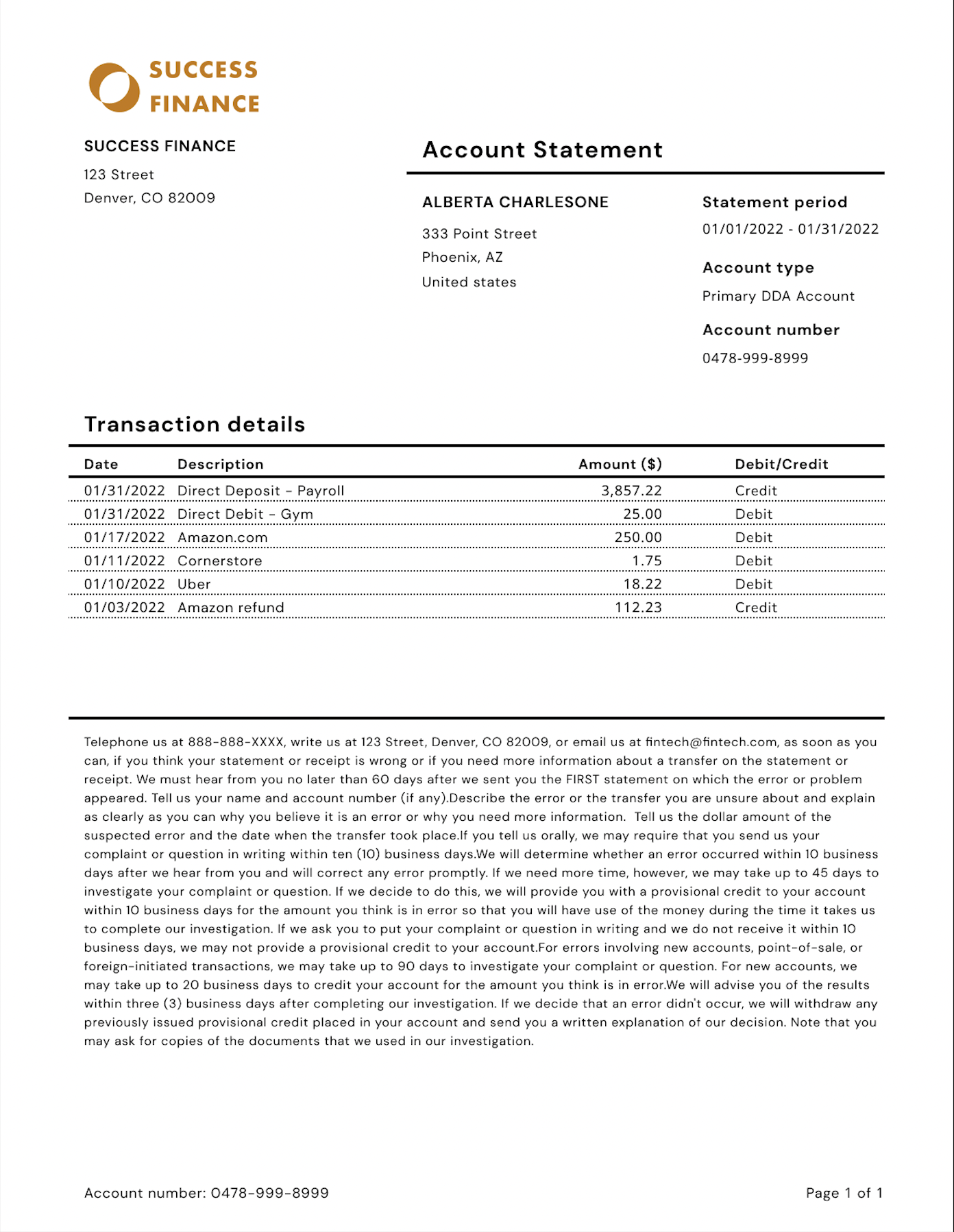
In order to produce regulatory-compliant, human-readable statements, this API provides the following information:
| Section | Field(s) | Description |
| --------------------------------- | ------------------------------------------- | ----------------------------------------------------------------------------------------------------------------------------------------------------------------------------------------------- |
| | `start_date` and `end_date` | The date interval covered by the statement, inclusive. |
| | `issue_date` | The date the statement was issued. |
| | `opening_balance` and `closing_balance` | The final posted balances recorded at the beginning of `start_date` and at the end of `end_date`. |
| | `disclosure` | A suggested disclosure statement to display. |
| | `transactions` (**deprecated**) | A list of transactions posted during the statement period. This field is deprecated, please see [this section](#step-3-list-the-transactions-for-a-statement) for details. |
| `account_summary` | - | Information about the account. |
| `account_summary` | `financial_institution` | Information about the financial institution managing the account. |
| `customer_service_details` | - | Contact information for use by the customer if they wish to dispute the information in this statement. |
| `primary_account_holder_personal` | - | When `account_summary.customer_type` is `PERSONAL` then `primary_account_holder_personal` contains information about the person acting as primary account holder. |
| `primary_account_holder_business` | - | When `account_summary.customer_type` is `BUSINESS` then `primary_account_holder_business` contains information about the company holding this account. |
| `joint_account_holders` | - | A list of all individuals designated as joint account holders for this account. |
| `authorized_signer` | - | A list of all individuals designated as authorized signers for this account. |
| `savings_summary` | `apy` | If the account has an interest product associated with it, this field will describe the APY earned based on the interest payout in this period. |
| `savings_summary` | `interest_earned` and `interest_earned_ytd` | If the account has an interest product associated with it, this field will describe the interest earned on during this billing period, and the sum of interest earned during the calendar year. |
For more details about the schema returned by this API, please refer to the [Statements API specification](/reference/getstatement).
Here is a sample statement produced using the information provided by this API:
 ### Webhook Events
This section assumes you are familiar with our webhook API. If not, please see the [webhooks guide](/docs/webhooks-guide) for more context.
When a statement is generated, a webhook notification will be sent to subscribers of event type `STATEMENT.CREATED`. The event will contain a full version of the statement payload, following the spec outlined in the [Statements API specification](/reference/getstatement).
Please note that if a statement contains an excessive number of transactions, the system may opt to return an empty list in the webhook notification to the subscriber due to technical limitations. This will be reflected in the payload with `transactions_omitted` set to `"true"` and an empty `transactions` attribute.
## API Workflow
If statements are available for an account, you can retrieve a summarized list by calling [`GET /v0/statements`](/reference/liststatements), with an `account_id` query parameter:
```shell Shell theme={"system"}
curl --request GET \
--url https://api.synctera.com/v0/statements?account_id=37083b2c-d3f9-4a7f-b781-7342285c368e \
-H 'Accept: application/json' \
-H "Authorization: Bearer $apikey"
```
This route only gives high-level details about each statement. Once you know the ID of the statement you're looking for, you can retrieve details about that statement.
With a statement ID, you'll be able to pull detailed information about the statement:
```shell Shell theme={"system"}
curl --request GET \
--url https://api.synctera.com/v0/statements/a4554821-22c2-4053-8b50-768365b98c83 \
-H 'Accept: application/json' \
-H "Authorization: Bearer $apikey"
```
Transaction information will be omitted from the statement detail response payload in future versions of the API. We recommend that all existing clients migrate to calling the dedicated transactions endpoint instead of relying on the `transactions` attribute.
With a statement ID, you'll be able to pull the list of transactions that pertain to that statement:
```shell Shell theme={"system"}
curl --request GET \
--url https://api.synctera.com/v0/statements/a4554821-22c2-4053-8b50-768365b98c83/transactions \
-H 'Accept: application/json' \
-H "Authorization: Bearer $apikey"
```
This list will only include posted transactions at the time of statement generation. These are also only returned to you in descending order of posted date.
### Webhook Events
This section assumes you are familiar with our webhook API. If not, please see the [webhooks guide](/docs/webhooks-guide) for more context.
When a statement is generated, a webhook notification will be sent to subscribers of event type `STATEMENT.CREATED`. The event will contain a full version of the statement payload, following the spec outlined in the [Statements API specification](/reference/getstatement).
Please note that if a statement contains an excessive number of transactions, the system may opt to return an empty list in the webhook notification to the subscriber due to technical limitations. This will be reflected in the payload with `transactions_omitted` set to `"true"` and an empty `transactions` attribute.
## API Workflow
If statements are available for an account, you can retrieve a summarized list by calling [`GET /v0/statements`](/reference/liststatements), with an `account_id` query parameter:
```shell Shell theme={"system"}
curl --request GET \
--url https://api.synctera.com/v0/statements?account_id=37083b2c-d3f9-4a7f-b781-7342285c368e \
-H 'Accept: application/json' \
-H "Authorization: Bearer $apikey"
```
This route only gives high-level details about each statement. Once you know the ID of the statement you're looking for, you can retrieve details about that statement.
With a statement ID, you'll be able to pull detailed information about the statement:
```shell Shell theme={"system"}
curl --request GET \
--url https://api.synctera.com/v0/statements/a4554821-22c2-4053-8b50-768365b98c83 \
-H 'Accept: application/json' \
-H "Authorization: Bearer $apikey"
```
Transaction information will be omitted from the statement detail response payload in future versions of the API. We recommend that all existing clients migrate to calling the dedicated transactions endpoint instead of relying on the `transactions` attribute.
With a statement ID, you'll be able to pull the list of transactions that pertain to that statement:
```shell Shell theme={"system"}
curl --request GET \
--url https://api.synctera.com/v0/statements/a4554821-22c2-4053-8b50-768365b98c83/transactions \
-H 'Accept: application/json' \
-H "Authorization: Bearer $apikey"
```
This list will only include posted transactions at the time of statement generation. These are also only returned to you in descending order of posted date.