> ## Documentation Index
> Fetch the complete documentation index at: https://docs.synctera.com/llms.txt
> Use this file to discover all available pages before exploring further.

# Reveal Card Widget

> Securely display sensitive card information (card number, security code, expiration) directly in your application.

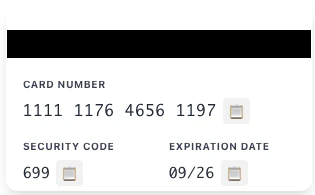
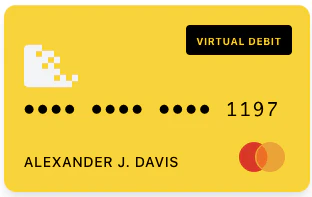
The Reveal Card widget allows you to securely display sensitive card information — card number (PAN), security code (CVV), and expiration date — directly in your application. All sensitive data is fetched and rendered in an isolated iframe, helping reduce your PCI scope.

<Warning>
  The `<card-reveal-widget>` element has been renamed to `<reveal-card>`. The old element name continues to work via a backwards-compatible alias but will be removed in a future major version. Please update your integration to use `<reveal-card>`.
</Warning>

<CardGroup>
  <Frame>
    <img src="https://mintcdn.com/synctera/oMPibgBNXdRrv2-B/images/cards/widgets/reveal-card-front.png?fit=max&auto=format&n=oMPibgBNXdRrv2-B&q=85&s=71e2fcf4474ad8e0d6e9fe1030bdec12" alt="Reveal Card Front" width="312" height="197" data-path="images/cards/widgets/reveal-card-front.png" />
  </Frame>

  <Frame>
    <img src="https://mintcdn.com/synctera/oMPibgBNXdRrv2-B/images/cards/widgets/reveal-card-back.png?fit=max&auto=format&n=oMPibgBNXdRrv2-B&q=85&s=fbf88c0370cfb1168f8073354dc11f64" alt="Reveal Card Back" width="315" height="195" data-path="images/cards/widgets/reveal-card-back.png" />
  </Frame>
</CardGroup>

## Step 1: Load the Widget Script

Load the Reveal Card widget script into your page:

<CodeGroup>
  ```html HTML theme={"system"}
  <script
    type="module"
    src="https://assets.synctera.com/widgets/reveal-card/v1.1.1/index.js"
  ></script>
  ```

  ```javascript React theme={"system"}
  import { useEffect } from 'react';

  function RevealCard({ widgetToken }) {
    useEffect(() => {
      const script = document.createElement('script');
      script.type = 'module';
      script.src = 'https://assets.synctera.com/widgets/reveal-card/v1.1.1/index.js';
      document.head.appendChild(script);

      return () => {
        document.head.removeChild(script);
      };
    }, []);

    return (
      <reveal-card
        token={widgetToken}
        env="production"
      />
    );
  }
  ```
</CodeGroup>

## Step 2: Get a Widget Token

Request a widget token for revealing card details:

<CodeGroup>
  ```bash curl theme={"system"}
  curl -X GET "https://api.synctera.com/v2/cards/{card_id}/widget_token?widget_type=REVEAL" \
    -H "Authorization: Bearer {apiKey}" \
    -H "Content-Type: application/json"
  ```

  ```javascript Node.js theme={"system"}
  const response = await fetch(
    `https://api.synctera.com/v2/cards/${cardId}/widget_token?widget_type=REVEAL`,
    {
      method: 'GET',
      headers: {
        'Authorization': `Bearer ${apiKey}`,
        'Content-Type': 'application/json'
      }
    }
  );

  const { widget_token } = await response.json();
  ```
</CodeGroup>

<Warning>
  Widget tokens expire after **5 minutes** and are scoped to a specific card. Generate a new token on each page load or when the user initiates a new reveal action.
</Warning>

## Step 3: Add the Widget Component

Add the `<reveal-card>` web component to your page:

```html theme={"system"}
<reveal-card
  token="your-widget-token"
  env="production"
></reveal-card>
```

***

## Configuration Options

| Property          | Type      | Required | Default      | Description                                                                                             |
| ----------------- | --------- | -------- | ------------ | ------------------------------------------------------------------------------------------------------- |
| `token`           | `string`  | Yes      | -            | Widget token obtained from the API                                                                      |
| `env`             | `string`  | Yes      | -            | Environment: `sandbox` or `production`                                                                  |
| `theme`           | `string`  | No       | `"default"`  | Theme preset: `"default"` or `"night-shift"`                                                            |
| `styles`          | `string`  | No       | `{}`         | JSON string of [design tokens](/v2/docs/card-widgets-theming) for visual customization                  |
| `card-side`       | `string`  | No       | `"front"`    | Which side to show initially: `"front"` or `"back"`                                                     |
| `card-form`       | `string`  | No       | `"physical"` | Card form factor: `"physical"` or `"virtual"`                                                           |
| `card-type`       | `string`  | No       | `""`         | Card type label displayed on the card (e.g., `"DEBIT"`, `"CREDIT"`)                                     |
| `last-four`       | `string`  | No       | `""`         | Last 4 digits of PAN, shown on the card front                                                           |
| `emboss-name`     | `string`  | No       | `""`         | Cardholder name displayed on the card front (line 1)                                                    |
| `emboss-name-two` | `string`  | No       | `""`         | Optional second emboss line displayed below the cardholder name in a smaller font (e.g., business name) |
| `card-network`    | `string`  | No       | `"visa"`     | Card network: `"visa"` or `"mastercard"`                                                                |
| `show-toggle`     | `boolean` | No       | `false`      | Renders a built-in toggle to reveal/hide card details                                                   |
| `toggle-label`    | `string`  | No       | `""`         | Custom label text for the built-in toggle                                                               |
| `custom-labels`   | `string`  | No       | `"{}"`       | JSON string of custom labels                                                                            |

### Card Side and Form

The widget renders a visual card with front and back views:

<CodeGroup>
  ```html Front Side (default) theme={"system"}
  <reveal-card
    token="your-token"
    env="production"
    card-side="front"
    last-four="1234"
    emboss-name="Jane Doe"
    emboss-name-two="Acme Corp"
    card-type="DEBIT"
    card-network="visa"
  ></reveal-card>
  ```

  ```html Back Side theme={"system"}
  <reveal-card
    token="your-token"
    env="production"
    card-side="back"
  ></reveal-card>
  ```

  ```html Virtual Card theme={"system"}
  <reveal-card
    token="your-token"
    env="production"
    card-form="virtual"
    card-type="DEBIT"
  ></reveal-card>
  ```
</CodeGroup>

### Built-in Toggle

Set `show-toggle` to render a toggle switch below the card that triggers the card reveal:

```html theme={"system"}
<reveal-card
  token="your-token"
  env="production"
  show-toggle
  toggle-label="Show card details"
></reveal-card>
```

### Custom Labels

Customize the labels displayed in the widget:

```html theme={"system"}
<reveal-card
  token="your-token"
  env="production"
  custom-labels='{
    "panLabel": "Card Number",
    "cvvLabel": "Security Code",
    "expiryLabel": "Expires",
    "retryButtonText": "Retry",
    "toggleLabel": "Show Card Details",
    "cardholderPlaceholder": "CARDHOLDER"
  }'
></reveal-card>
```

Available custom label keys:

* `panLabel` - Card number label (back side)
* `cvvLabel` - CVV label (back side)
* `expiryLabel` - Expiration date label (back side)
* `retryButtonText` - Error state retry button text
* `toggleLabel` - Built-in toggle label text
* `cardholderPlaceholder` - Placeholder text when `emboss-name` is empty

***

## Event Handling

The widget dispatches events for both initialization and card reveal outcomes:

* **`load`** — The widget finished initializing and is ready to use.
* **`error`** — The widget failed to initialize (network/CSP failure or handshake timeout).
* **`success`** — Card details retrieved successfully.
* **`failure`** — Card reveal failed (API error, timeout, etc.).
* **`copy`** — A card field value was copied to the clipboard.

You can subscribe with `addEventListener` or by assigning the matching callback property:

| Event                     | `addEventListener`                       | Callback property           |
| ------------------------- | ---------------------------------------- | --------------------------- |
| Initialization success    | `widget.addEventListener('load', fn)`    | `widget.onLoad = fn`        |
| Initialization failure    | `widget.addEventListener('error', fn)`   | `widget.onError = fn`       |
| Reveal success            | `widget.addEventListener('success', fn)` | `widget.onSuccess = fn`     |
| Reveal failure            | `widget.addEventListener('failure', fn)` | `widget.onFailure = fn`     |
| Field copied to clipboard | `widget.addEventListener('copy', fn)`    | *not exposed as a property* |

### Load Event

Dispatched once when the widget has finished initializing and is ready to use. Use this to reveal the widget UI only after it's ready, or to dismiss a loading placeholder. Fires exactly once per iframe lifecycle.

| Property     | Type     | Description                        |
| ------------ | -------- | ---------------------------------- |
| `instanceId` | `string` | Unique ID for this widget instance |

```html theme={"system"}
<reveal-card id="reveal-widget" token="your-token" env="production"></reveal-card>
<script>
  document.getElementById('reveal-widget').addEventListener('load', (event) => {
    const { instanceId } = event.detail;
    console.log('Widget ready', instanceId);
  });
</script>
```

### Error Event

Dispatched once when the widget fails to initialize — either because the underlying iframe could not load (network failure, blocked by Content Security Policy, etc.) or because the iframe loaded but never completed its handshake within 5 seconds. This is distinct from the `failure` event, which signals that a card reveal API call failed *after* the widget was already running.

| Property       | Type       | Description                                                                                                                                  |
| -------------- | ---------- | -------------------------------------------------------------------------------------------------------------------------------------------- |
| `error`        | `string`   | Human-readable error message (safe to display to end users)                                                                                  |
| `failedFields` | `string[]` | Logical surfaces that failed to initialize. The Reveal Card widget has a single display surface, so this is always `['display-controller']`. |
| `instanceId`   | `string`   | Unique ID for this widget instance                                                                                                           |

```html theme={"system"}
<script>
  document.getElementById('reveal-widget').addEventListener('error', (event) => {
    const { error, failedFields } = event.detail;
    console.error('Widget initialization failed:', error, failedFields);
    // Show error UI or offer a retry button
  });
</script>
```

### Success Event

Dispatched when card details are successfully retrieved and rendered inside the widget's secure iframe. Sensitive card data (PAN, CVV, expiration) is never exposed to the host page.

| Property     | Type     | Description                        |
| ------------ | -------- | ---------------------------------- |
| `instanceId` | `string` | Unique ID for this widget instance |

```html theme={"system"}
<reveal-card id="reveal-widget" token="your-token" env="production"></reveal-card>
<script>
  document.getElementById('reveal-widget').addEventListener('success', (event) => {
    const { instanceId } = event.detail;
    console.log('Card revealed successfully', instanceId);
  });
</script>
```

### Failure Event

Dispatched when the card reveal API call fails.

| Property     | Type     | Description                        |
| ------------ | -------- | ---------------------------------- |
| `error`      | `string` | Human-readable error message       |
| `instanceId` | `string` | Unique ID for this widget instance |

```html theme={"system"}
<script>
  document.getElementById('reveal-widget').addEventListener('failure', (event) => {
    const { error } = event.detail;
    console.error('Card reveal failed:', error);
    // Show error UI to user
  });
</script>
```

### Copy Event

Dispatched when a user copies a card field value (card number, security code, or expiration) to the clipboard using the copy buttons inside the widget. The actual clipboard operation happens within the secure iframe — no PCI data is exposed in the event.

| Property     | Type     | Description                        |
| ------------ | -------- | ---------------------------------- |
| `instanceId` | `string` | Unique ID for this widget instance |

```html theme={"system"}
<script>
  document.getElementById('reveal-widget').addEventListener('copy', (event) => {
    const { instanceId } = event.detail;
    console.log('Field copied to clipboard', instanceId);
  });
</script>
```

***

## Public Methods

The widget exposes methods for programmatic control. These are useful when you want to control the reveal behavior externally instead of using the built-in toggle.

| Method                | Description                            |
| --------------------- | -------------------------------------- |
| `requestCardReveal()` | Trigger the card reveal API call       |
| `toggleCardSide()`    | Flip between front and back views      |
| `setCardSide(side)`   | Set card side to `"front"` or `"back"` |
| `refresh()`           | Reset state and re-fetch card details  |

```html theme={"system"}
<reveal-card
  id="reveal-widget"
  token="your-token"
  env="production"
></reveal-card>

<button onclick="document.getElementById('reveal-widget').requestCardReveal()">
  Reveal Card
</button>

<button onclick="document.getElementById('reveal-widget').toggleCardSide()">
  Flip Card
</button>
```

***

## Complete Example

<CodeGroup>
  ```html Complete HTML Example theme={"system"}
  <!DOCTYPE html>
  <html lang="en">
    <head>
      <meta charset="utf-8" />
      <title>Card Reveal</title>
      <script
        type="module"
        src="https://assets.synctera.com/widgets/reveal-card/v1.1.1/index.js"
      ></script>
    </head>
    <body>
      <h1>Your Card</h1>

      <div id="error-message" style="color: red; display: none;"></div>

      <reveal-card
        id="reveal-widget"
        env="production"
        card-side="front"
        last-four="1234"
        emboss-name="Jane Doe"
        emboss-name-two="Acme Corp"
        card-network="visa"
        card-type="DEBIT"
        show-toggle
      ></reveal-card>

      <script>
        async function initializeWidget() {
          try {
            const response = await fetch('/api/card-widget-token', {
              method: 'POST',
              headers: { 'Content-Type': 'application/json' },
              body: JSON.stringify({
                card_id: 'your-card-id',
                widget_type: 'REVEAL'
              })
            });

            const { widget_token } = await response.json();

            const widget = document.getElementById('reveal-widget');
            widget.setAttribute('token', widget_token);

            widget.addEventListener('load', (event) => {
              console.log('Widget ready:', event.detail.instanceId);
            });

            widget.addEventListener('error', (event) => {
              const { error, failedFields } = event.detail;
              console.error('Widget failed to initialize:', error, failedFields);
              document.getElementById('error-message').textContent = error;
              document.getElementById('error-message').style.display = 'block';
            });

            widget.addEventListener('success', (event) => {
              console.log('Card revealed:', event.detail);
            });

            widget.addEventListener('failure', (event) => {
              document.getElementById('error-message').textContent = event.detail.error;
              document.getElementById('error-message').style.display = 'block';
            });

          } catch (error) {
            console.error('Failed to initialize widget:', error);
          }
        }

        window.addEventListener('DOMContentLoaded', initializeWidget);
      </script>
    </body>
  </html>
  ```

  ```javascript React Example theme={"system"}
  import { useEffect, useState, useRef } from 'react';

  function RevealCardView({ cardId }) {
    const [widgetToken, setWidgetToken] = useState(null);
    const [error, setError] = useState(null);
    const widgetRef = useRef(null);

    useEffect(() => {
      const script = document.createElement('script');
      script.type = 'module';
      script.src = 'https://assets.synctera.com/widgets/reveal-card/v1.1.1/index.js';
      document.head.appendChild(script);

      fetch('/api/card-widget-token', {
        method: 'POST',
        headers: { 'Content-Type': 'application/json' },
        body: JSON.stringify({ card_id: cardId, widget_type: 'REVEAL' })
      })
        .then(res => res.json())
        .then(data => setWidgetToken(data.widget_token))
        .catch(err => setError(err.message));

      return () => {
        document.head.removeChild(script);
      };
    }, [cardId]);

    useEffect(() => {
      if (!widgetToken || !widgetRef.current) return;

      const handleLoad = (event) => {
        console.log('Widget ready:', event.detail.instanceId);
      };

      const handleError = (event) => {
        const { error: initError, failedFields } = event.detail;
        console.error('Widget failed to initialize:', initError, failedFields);
        setError(initError);
      };

      const handleSuccess = (event) => {
        console.log('Card revealed:', event.detail);
      };

      const handleFailure = (event) => {
        setError(event.detail.error);
      };

      const widget = widgetRef.current;
      widget.addEventListener('load', handleLoad);
      widget.addEventListener('error', handleError);
      widget.addEventListener('success', handleSuccess);
      widget.addEventListener('failure', handleFailure);

      return () => {
        widget.removeEventListener('load', handleLoad);
        widget.removeEventListener('error', handleError);
        widget.removeEventListener('success', handleSuccess);
        widget.removeEventListener('failure', handleFailure);
      };
    }, [widgetToken]);

    if (error) return <div style={{ color: 'red' }}>Error: {error}</div>;
    if (!widgetToken) return <div>Loading...</div>;

    return (
      <reveal-card
        ref={widgetRef}
        token={widgetToken}
        env="production"
        card-side="front"
        last-four="1234"
        emboss-name="Jane Doe"
        emboss-name-two="Acme Corp"
        card-network="visa"
        show-toggle
      />
    );
  }

  export default RevealCardView;
  ```
</CodeGroup>

***

## Migration from card-reveal-widget

The Reveal Card widget was previously named `<card-reveal-widget>`. It has been renamed to `<reveal-card>` for consistency with the other Synctera widgets (`<activate-card>`, `<set-pin>`).

### What changed

1. **CDN URL**: The script URL changed from `widgets/card-reveal/v1.0.0/index.js` to `widgets/reveal-card/v1.1.1/index.js`
2. **Element name**: The custom element changed from `<card-reveal-widget>` to `<reveal-card>`
3. **Existing public methods and events are unchanged** (`requestCardReveal()`, `toggleCardSide()`, `setCardSide()`, `refresh()`, `success`, `failure`, `copy`)
4. **New initialization events**: `<reveal-card>` adds `load` and `error` events (plus matching `onLoad` / `onError` callback properties) so you can react to the widget becoming ready or failing to initialize — see [Event Handling](#event-handling). These events are additive and existing integrations continue to work without changes.

### Backwards compatibility

The new widget script registers both `<reveal-card>` (recommended) and `<card-reveal-widget>` (deprecated alias). If you load the new CDN URL, your existing `<card-reveal-widget>` elements will continue to work, but a deprecation warning will be logged to the browser console.

### Migration steps

1. Update the script tag to use the new CDN URL
2. Replace `<card-reveal-widget>` with `<reveal-card>` in your HTML
3. Update any `document.querySelector('card-reveal-widget')` or `document.createElement('card-reveal-widget')` calls

<Warning>
  The old CDN URL (`widgets/card-reveal/v1.0.0/index.js`) is frozen and will not receive updates. Switch to the new URL to receive future improvements and fixes.
</Warning>