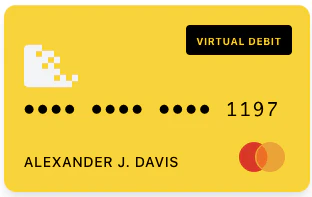
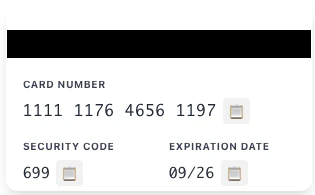
Securely display sensitive card information (card number, security code, expiration) directly in your application.
The Reveal Card widget allows you to securely display sensitive card information — card number (PAN), security code (CVV), and expiration date — directly in your application. All sensitive data is fetched and rendered in an isolated iframe, helping reduce your PCI scope.
The <card-reveal-widget> element has been renamed to <reveal-card>. The old element name continues to work via a backwards-compatible alias but will be removed in a future major version. Please update your integration to use <reveal-card>.
Widget tokens expire after 5 minutes and are scoped to a specific card. Generate a new token on each page load or when the user initiates a new reveal action.
Dispatched once when the widget has finished initializing and is ready to use. Use this to reveal the widget UI only after it’s ready, or to dismiss a loading placeholder. Fires exactly once per iframe lifecycle.
Dispatched once when the widget fails to initialize — either because the underlying iframe could not load (network failure, blocked by Content Security Policy, etc.) or because the iframe loaded but never completed its handshake within 5 seconds. This is distinct from the failure event, which signals that a card reveal API call failed after the widget was already running.
Property
Type
Description
error
string
Human-readable error message (safe to display to end users)
failedFields
string[]
Logical surfaces that failed to initialize. The Reveal Card widget has a single display surface, so this is always ['display-controller'].
instanceId
string
Unique ID for this widget instance
<script> document.getElementById('reveal-widget').addEventListener('error', (event) => { const { error, failedFields } = event.detail; console.error('Widget initialization failed:', error, failedFields); // Show error UI or offer a retry button });</script>
Dispatched when card details are successfully retrieved and rendered inside the widget’s secure iframe. Sensitive card data (PAN, CVV, expiration) is never exposed to the host page.
Dispatched when a user copies a card field value (card number, security code, or expiration) to the clipboard using the copy buttons inside the widget. The actual clipboard operation happens within the secure iframe — no PCI data is exposed in the event.
The widget exposes methods for programmatic control. These are useful when you want to control the reveal behavior externally instead of using the built-in toggle.
The Reveal Card widget was previously named <card-reveal-widget>. It has been renamed to <reveal-card> for consistency with the other Synctera widgets (<activate-card>, <set-pin>).
CDN URL: The script URL changed from widgets/card-reveal/v1.0.0/index.js to widgets/reveal-card/v1.1.1/index.js
Element name: The custom element changed from <card-reveal-widget> to <reveal-card>
Existing public methods and events are unchanged (requestCardReveal(), toggleCardSide(), setCardSide(), refresh(), success, failure, copy)
New initialization events: <reveal-card> adds load and error events (plus matching onLoad / onError callback properties) so you can react to the widget becoming ready or failing to initialize — see Event Handling. These events are additive and existing integrations continue to work without changes.
The new widget script registers both <reveal-card> (recommended) and <card-reveal-widget> (deprecated alias). If you load the new CDN URL, your existing <card-reveal-widget> elements will continue to work, but a deprecation warning will be logged to the browser console.
Replace <card-reveal-widget> with <reveal-card> in your HTML
Update any document.querySelector('card-reveal-widget') or document.createElement('card-reveal-widget') calls
The old CDN URL (widgets/card-reveal/v1.0.0/index.js) is frozen and will not receive updates. Switch to the new URL to receive future improvements and fixes.
Was this page helpful?
Assistant
Responses are generated using AI and may contain mistakes.