

pinReveal) flow. For the deprecated Marqeta integration, see Marqeta Widgets.
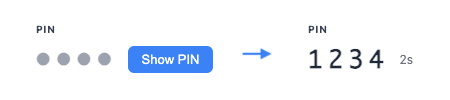
Step 1: Load the Widget Script
Load the Reveal PIN widget script into your page:Step 2: Get a Widget Token
Request a widget token scoped to revealing the card’s PIN. Use theGET_PIN widget type:
Step 3: Add the Widget Component
Add the<reveal-pin> web component to your page:
show-toggle) or by calling requestPin() from your own UI. Once revealed, the PIN displays with a live auto-hide countdown and is cleared automatically when the countdown ends.
Configuration Options
Auto-hide Countdown
The PIN auto-hides afterauto-hide-seconds (default 5), mirroring the legacy Marqeta hidePinTimeout behavior. This is a PCI safeguard, not just a UX nicety: it limits how long the PIN is on screen.
Built-in Button
Setshow-toggle to render a built-in Show PIN button next to the obscured dots. When omitted, you control the reveal yourself by calling requestPin().
Custom Labels
Customize the labels displayed in the widget:pinLabel- Label shown above the PIN (default: none — no label is rendered unless you provide one)toggleLabel- Built-in button label (default:"Show PIN"). The dedicatedtoggle-labelattribute takes precedence if both are set.retryButtonText- Error state retry button text (default:"Try Again")
Event Handling
The widget dispatches events for both initialization and PIN reveal outcomes:load— The widget finished initializing and is ready to use.error— The widget failed to initialize (network/CSP failure or handshake timeout).success— PIN retrieved and rendered successfully inside the secure iframe.failure— PIN reveal failed (API error, timeout, etc.).
The Reveal PIN widget does not emit a
copy event. The PIN cannot be copied to the clipboard and text selection is disabled inside the widget — both are intentional PCI safeguards.addEventListener or by assigning the matching callback property:
Load Event
Dispatched once when the widget has finished initializing and is ready to use. Use this to reveal the widget UI only after it’s ready, or to dismiss a loading placeholder. Fires exactly once per iframe lifecycle.Error Event
Dispatched once when the widget fails to initialize — either because the underlying iframe could not load (network failure, blocked by Content Security Policy, etc.) or because the iframe loaded but never completed its handshake within 5 seconds. This is distinct from thefailure event, which signals that a PIN reveal API call failed after the widget was already running.
Success Event
Dispatched when the PIN is successfully retrieved and rendered inside the widget’s secure iframe. The PIN itself is never included in the event — only metadata.Failure Event
Dispatched when the PIN reveal API call fails.Public Methods
The widget exposes methods for programmatic control. These are useful when you want to control the reveal behavior externally instead of using the built-in button (show-toggle).
PCI Considerations
The Reveal PIN widget is designed to keep the PIN out of your PCI scope:- The PIN is fetched and rendered entirely inside the Synctera-origin iframe. It never crosses the iframe boundary to your page.
- The PIN is never included in any event (
successcarries only aninstanceId) and is never logged. - The PIN cannot be copied to the clipboard, and text selection is disabled, so it can’t be highlighted and copied.
- The PIN auto-hides after
auto-hide-secondsand is cleared from the DOM and memory when hidden.
Complete Example
Migration from Marqeta PIN Reveal
If you previously displayed the PIN using the Marqeta.jspinReveal component, the Reveal PIN widget is the modern, Synctera-hosted replacement.
See the Migration Guide for the Activate Card and Set PIN equivalents.